At a glance
Expert’s Rating
Pros
- Extreme performance
- Good battery life for a gaming laptop
- Great display for work and play
- Solid connectivity options
- Supports USB-C charging on the go
Cons
- Big, heavy, and plasticky
- Very expensive
- Marginal performance over cheaper competitors
- Keyboard and trackpad aren’t great
Our Verdict
The MSI Raider 16 Max HX is capable and has a great display to game on, but its hardware comes at a cost without bringing commensurate performance gains over the competition.
Price When Reviewed
This value will show the geolocated pricing text for product undefined
Best Pricing Today
Price When Reviewed
$4,099
Best Prices Today: MSI Raider 16 Max HX
MSI’s new Raider 16 Max HX is geared up to be the company’s most powerful 16-inch laptop, and it has the hardware to deliver. Boasting a new Intel Core Ultra 9 290HX Plus at its heart, RTX 50-series graphics, and 300 watts of combined power, it has the potential to deliver. It also touts a killer display. But leading the pack proves to be a challenge even with the right kind of hardware to do it, and that hardware drives up the price considerably, making the Lenovo Legion Pro 7i 16 Gen 10 a better bet for most gamers.
The RTX 5090 adds a lot to the price tag, but won’t do much in all gaming scenarios.
MSI Raider 16 Max HX: Specs and features
- CPU: Intel Core Ultra 9 290HX Plus
- Memory: 32GB DDR5-6400
- Graphics/GPU: Nvidia RTX 5090 24GB GDD7 175W
- Display: 16-inch 2560×1600 240Hz OLED
- Storage: 1TB PCIe Gen 4 SSD – Micron 2500 MTFDKBA1T0QGN
- Webcam: 1080p IR
- Connectivity: 2x Thunderbolt 4 with Power Delivery and DisplayPort Alternate Mode, 3 x USB 3.2 Gen 2 Type-A, 1x HDMI 2.1, 1x SD card reader, 1x 3.5mm audio, 2.5GbE
- Networking: Wi-Fi 7, Bluetooth 5.4
- Biometrics: Windows Hello facial recognition
- Battery capacity: 90 watt-hours
- Dimensions: 14.29 x 10.62 x 1.14 inches
- Weight: 5.85 pounds
- MSRP: $4,099 as-tested ($2,999 base)
The MSI Raider 16 Max HX has just a few configurations. They all share the specifications above, but differ in their graphics processors. The system starts out at $2,999 for an RTX 5070 Ti configuration. That bumps up to $3,499 for an RTX 5080. Our test configuration bumps to $4,099 for an RTX 5090 and also upgrades to Windows 11 Pro instead of Home.
At the time of writing, these models were available from Micro Center except for the 5090 version. There, the prices showed some uncertainty. Micro Center’s list prices matched what MSI had presented us except for on our test configuration, which was raised to $4,299. That said, all systems showed significant discounts of $1,000-$1,300, which would change their value considerably. It’s unclear how long such discounts will be available, but they’d certainly help the MSI Raider 16 Max HX stand a chance against the Lenovo Legion Pro 7i 16 Gen 10.
MSI Raider 16 Max HX: Design and build quality
Foundry / Mark Knapp
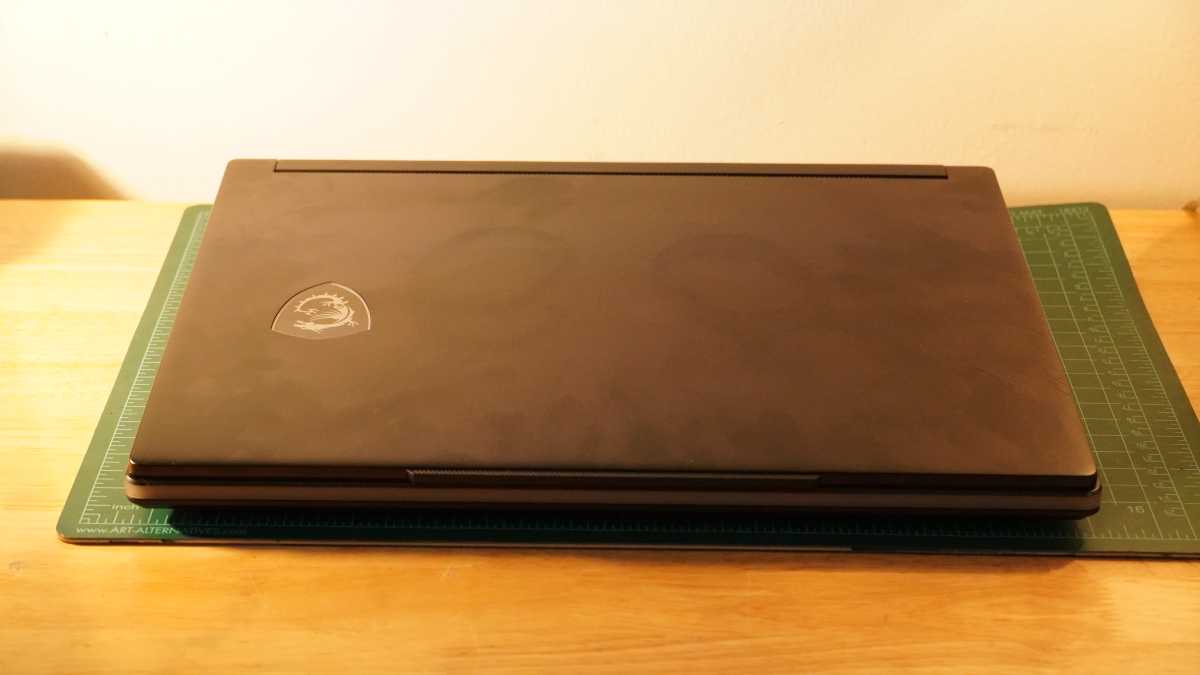
Like most 16-inch gaming laptops, the MSI Raider 16 Max HX is something of a tank. But it’s not altogether egregious. The system is wide, but not more than an inch wider than it needs to be to fit its display. Front to back, the laptop also avoids going overboard with an extensive rear end as seen on many recent gaming laptops. Alas, it’s thick, coming in at 1.14 inches, and that’s before accounting for the laptop’s rubber feet, which push it up toward 1.5 inches.
That thickness comes with some benefits, at least. The MSI Raider 16 Max HX provides access to the memory and storage through a small panel underneath, and there’s a free M.2 slot ready for upgrading the storage. The thick design also allows for some serious cooling, which lets the MSI Raider 16 Max HX run its GPU at up to 175W and the CPU at up to 125W at the same time.
Cool air gets pulled into the MSI Raider 16 Max HX by three fans through a series of grilles on the bottom and through two small ports above the keyboard. That air exhausts out two grilles on the sides and three on the rear. With the wide exhaust and space for large fans, the MSI Raider 16 Max HX is able to run under a heavy load while keeping fan noise below 50dBa from a typical arm’s length — a sound level I was able to verify. To be clear, that’s still noisy, but not quite blaring.
While the build has its merits in terms of the performance it enables, there’s a little bit less to love about it beyond that. The bottom of the chassis is made of a cheap-feeling, rough plastic while the keyboard deck is a smoother plastic. The display lid is metal, at least. There’s not much keyboard deck flex, but the display wiggles whenever I type, and its glossy finish makes that wiggling more apparent.
There’s plenty for the RGB lovers, though. An RGB light bar spans the front edge of the laptop, and that combines with an RGB keyboard and shield logo on the lid. The underside and lid exhibit some gamer aesthetics, but aren’t gaudy.
The MSI Raider 16 Max HX includes a massive, 400W power brick that weighs almost three pounds on its own. Combined with the laptop’s 5.85-pound weight, it’s not the most portable option out there. But, you can opt to charge via USB-C on-the-go and use a smaller charger, you just won’t get full power.
MSI Raider 16 Max HX: Keyboard, trackpad
Foundry / Mark Knapp
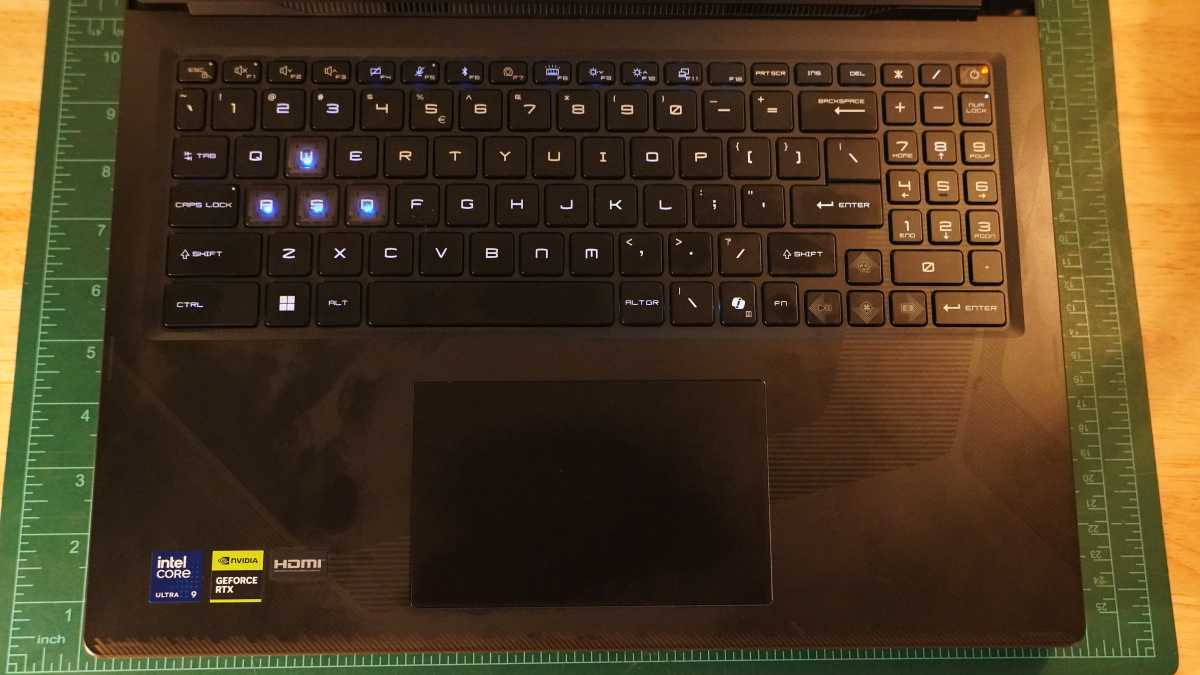
The MSI Raider 16 Max HX’s keyboard isn’t quite a masterpiece. While I was able to get up to 108 words-per-minute typing in Monkeytype with 98 percent accuracy, I still feel a little discomfort as the keycaps aren’t well stabilized and they lack much contour. I find that I struggle to keep centered on the keys and can wiggle or slip off the edges and hit neighbors, especially as I’m typing faster and faster. And that’s just basic typing.
Doing more navigation and editing becomes something of a pain. The number pad is both cramped and laid out in a non-traditional way. For both data entry and calculation, it will be a major readjustment. Meanwhile, the arrow keys are slightly shrunken and cut into the right shift key’s space, which I find leads to lots of accidental presses. The keyboard does get per-key RGB lighting, but that only makes it prettier, not much more functional.
The trackpad is decently sizable and has a good, smooth surface. But it doesn’t feel all that great otherwise. It has a cheap-feeling hardware click and even a bit of rattle when simply tapping to click.
MSI Raider 16 Max HX: Display, audio
Foundry / Mark Knapp
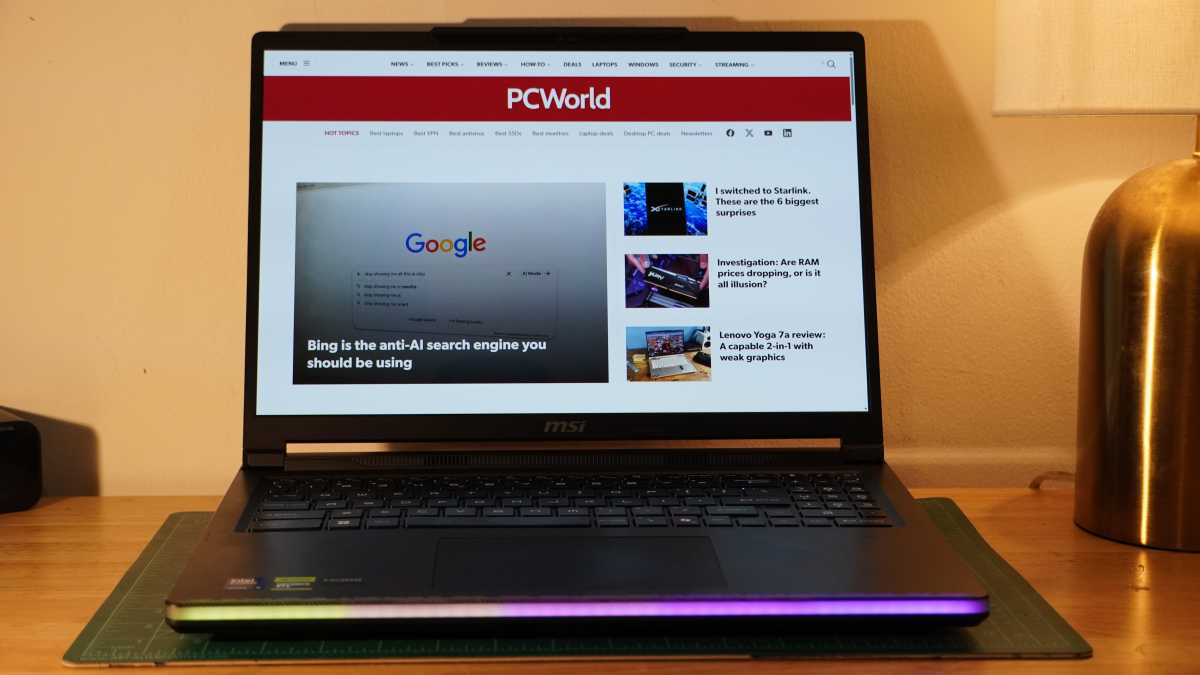
The MSI Raider 16 Max HX has a wonderful display for gaming. It’s a sharp 2560×1600 display with an OLED panel that simply looks fantastic. The screen offers perfect contrast and can hit very high brightness levels. In general, it’ll top out at 500 nits, but with HDR content I saw it hit as high as 614 nits for a full white window and 1,100 nits for a smaller 10 percent window. It provides that brightness and contrast alongside 99 percent coverage of the DCI-P3 color space and 100 percent coverage of the sRGB color space.
It’s even accurate with a max dE1976 of 1.74, so you could safely use it for creative color work. That excellent quality is matched by a 240Hz refresh rate that makes games look wonderfully smooth. It’s very similar to the display on the Lenovo Legion Pro 7i 16 Gen 10, but you won’t find G-Sync or VRR support on this built-in display, whereas Lenovo had it.
The MSI Raider 16 Max HX’s speaker setup is less impressive but respectable. It combines two tweeters and two woofers for a fuller sound. It lacks deep bass depth and ends up with a mid-heavy presentation. There’s a bit of undue sibilance from the setup at full volume that’s not entirely pleasant. For casual listening, they’re good enough and do a decent job covering up some of the system’s modest fan noise.
MSI Raider 16 Max HX: Webcam, microphone, biometrics
The MSI Raider 16 Max HX’s webcam leaves plenty to be desired. It can look OK in bright lighting conditions, such as when facing a bright window. But in anything less, it really struggles to get adequate light and this results in a very noisy image. Still, it has its perks. Namely, it has Windows Hello facial recognition for quick and easy sign-ins.
The mics aren’t any more special. They capture my voice fairly well, though with a good deal of room echo in the mix. They don’t cancel out all noises, such as clapping, but they do a good job with droning noises like fans or a lawn mower outside.
MSI Raider 16 Max HX: Connectivity
Foundry / Mark Knapp
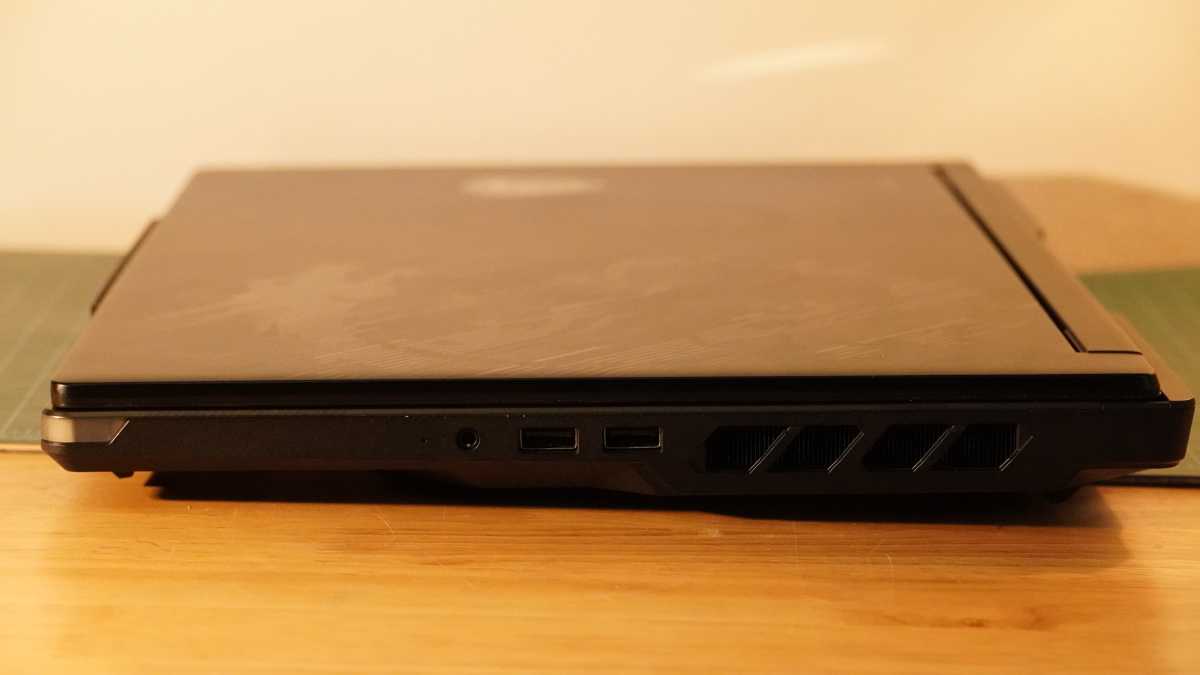
The MSI Raider 16 Max HX provides great connectivity. It includes a pair of Thunderbolt 4 ports to handle all sorts of high-transmission needs, including USB PD 3.1 and DisplayPort Alt Mode, though that power delivery tops out at 140W, so won’t be enough to keep the laptop running at full tilt. Those ports are on the left side along with a full-size SD card reader. The right side includes two USB-A 10Gbps ports and a headset jack. The rear adds even more with an extra 10Gbps USB-A port, an HDMI 2.1 port, 2.5GbE. The laptop’s dedicated charging port is also in the back and looks confusingly similar to a USB-A port.
The system offers tri-band Wi-Fi 7 connectivity as well, and this has been fast and stable in practice. Bluetooth lags a little behind with Bluetooth 5.4, though.
MSI Raider 16 Max HX: Performance
The MSI Raider 16 Max HX is an extreme performance machine, but as with many technologies, it faces diminishing returns. And it can struggle with the confines of a laptop from time to time.
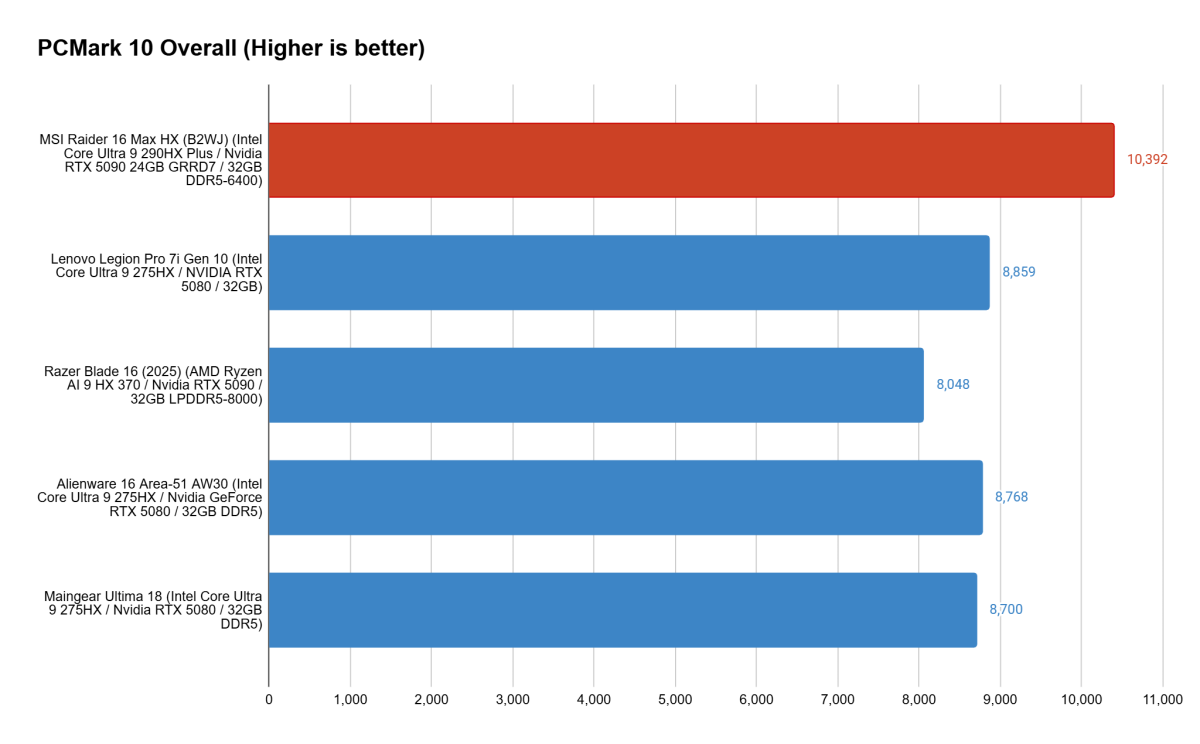
Of course, for regular office work, the MSI Raider 16 Max HX is beyond capable. It soars in PCMark 10, showing that it has what it takes to deal with spreadsheets, webconferencing, as well as more creative tasks like photo and video editing. While the score over 10,000 points is impressive, most laptops over even just 5,000 will be fast enough for basic office use.
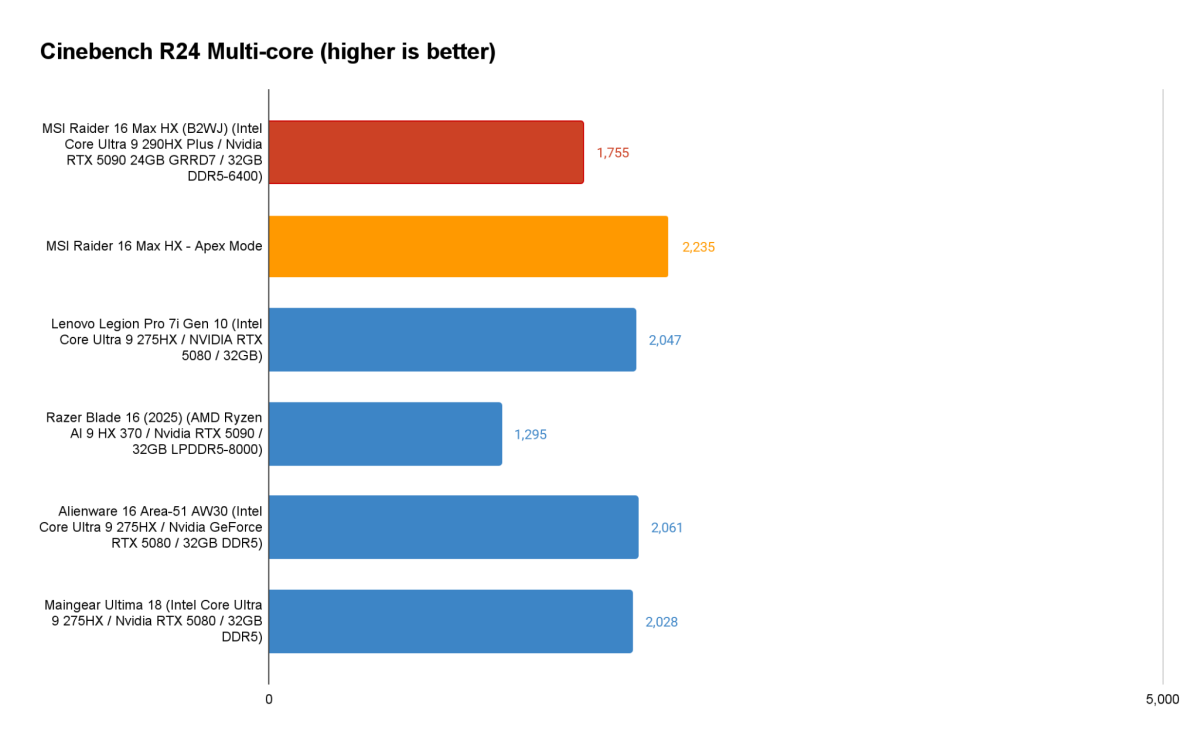
The CPU performance of the MSI Raider 16 Max HX is also impressive, but highlights the importance of power profiles. The MSI Raider 16 Max HX’s Intel Core Ultra 9 290HX Plus isn’t fully unleashed in the default Balanced power plan, which caps it at 45W. We can see it lagging behind the Lenovo Legion Pro 7i Gen 10’s and Alienware 16 Area-51 AW30’s Intel Core Ultra 9 275HX in raw performance in Cinebench R24, but when the MSI Raider 16 Max HX swaps over to its Apex Mode, granting the CPU up to 125W of power, it quickly leaps well ahead of the competition.
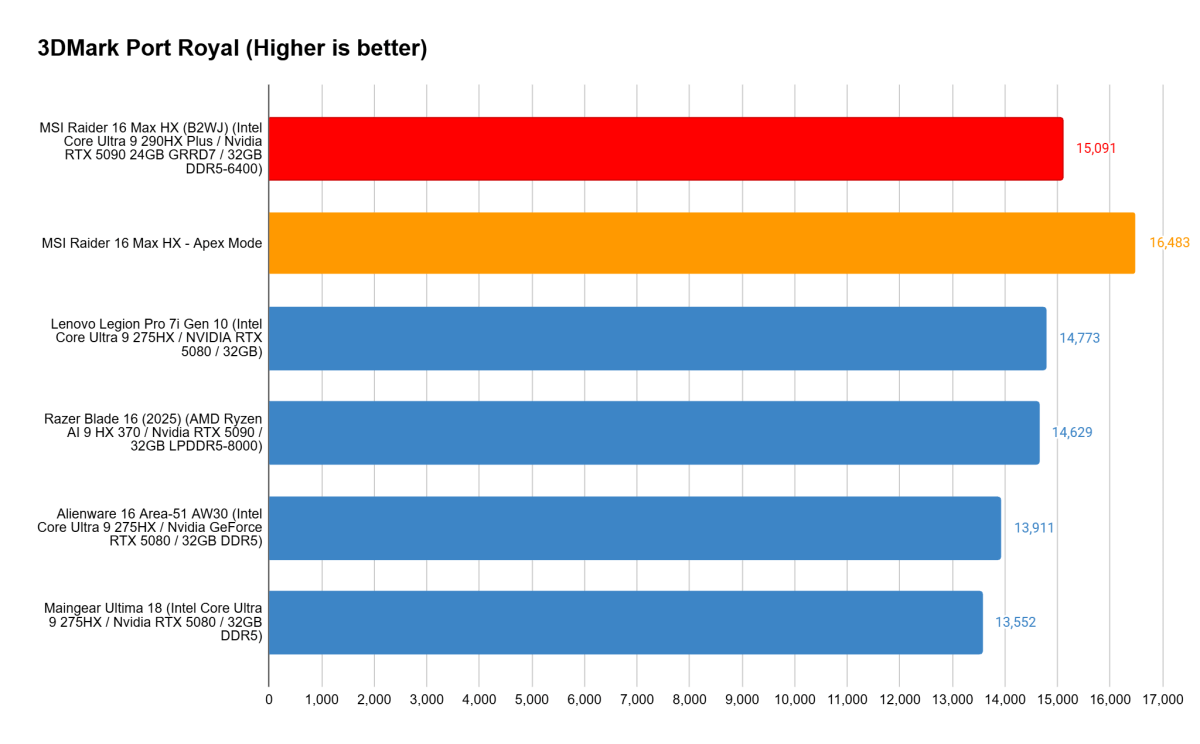
The power allowance continues to play a big role in the returns the MSI Raider 16 Max HX is able to offer in graphical benchmarks as well. In 3DMark’s demanding Port Royal test, the MSI Raider 16 Max HX leads the pack with its RTX 5090, but it has a fairly narrow margin over the Lenovo Legion Pro 7i Gen 10’s RTX 5080 until it swaps over to Apex Mode. Even though the Balanced mode allows the GPU to run at its full 175 watts, the CPU still plays a role in letting the GPU reach its full potential.
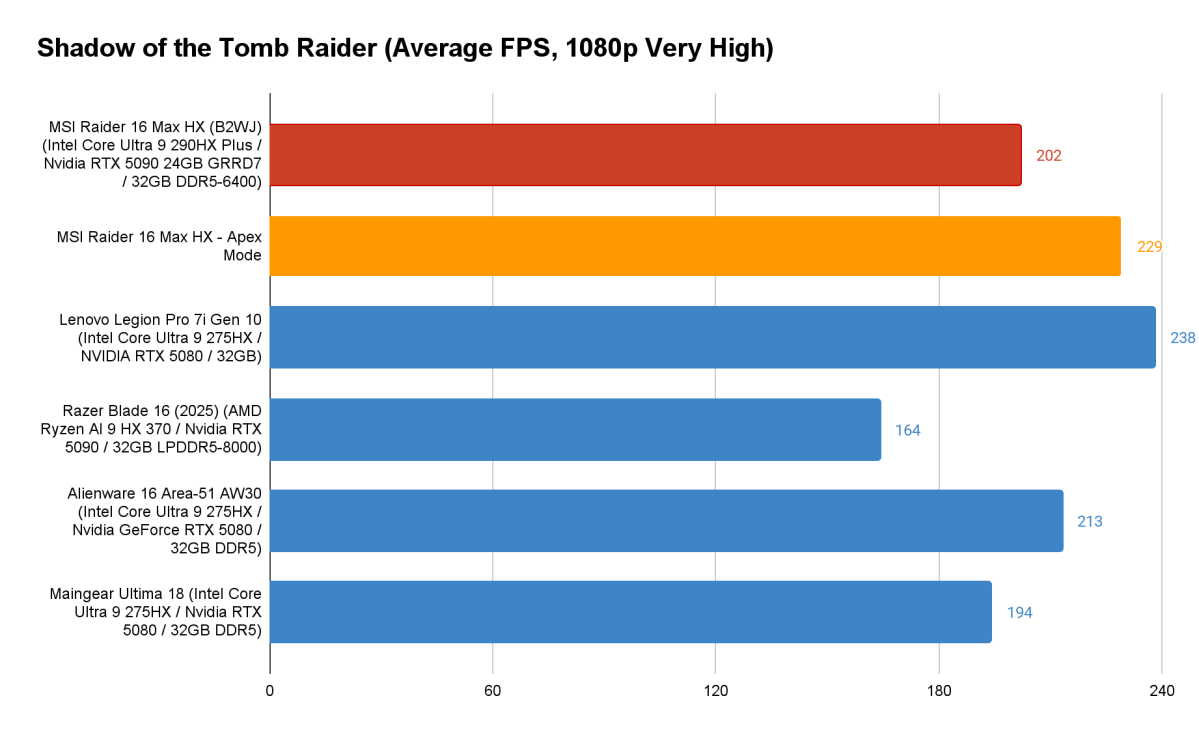
While synthetic benchmarks let the MSI Raider 16 Max HX ultimately lead the way, actual gaming proves a slightly different story. The MSI Raider 16 Max HX is fast, but it’s not stunning next to the crowd. Its RTX 5090 narrowly lets it beat the Maingear Ultimate 18, and it needs Apex Mode to surmount the Alienware 16 Area-51. Worse still, even with Apex Mode, the MSI Raider 16 Max HX lags behind the cheaper, sleeker Lenovo Legion Pro 7i Gen 10.
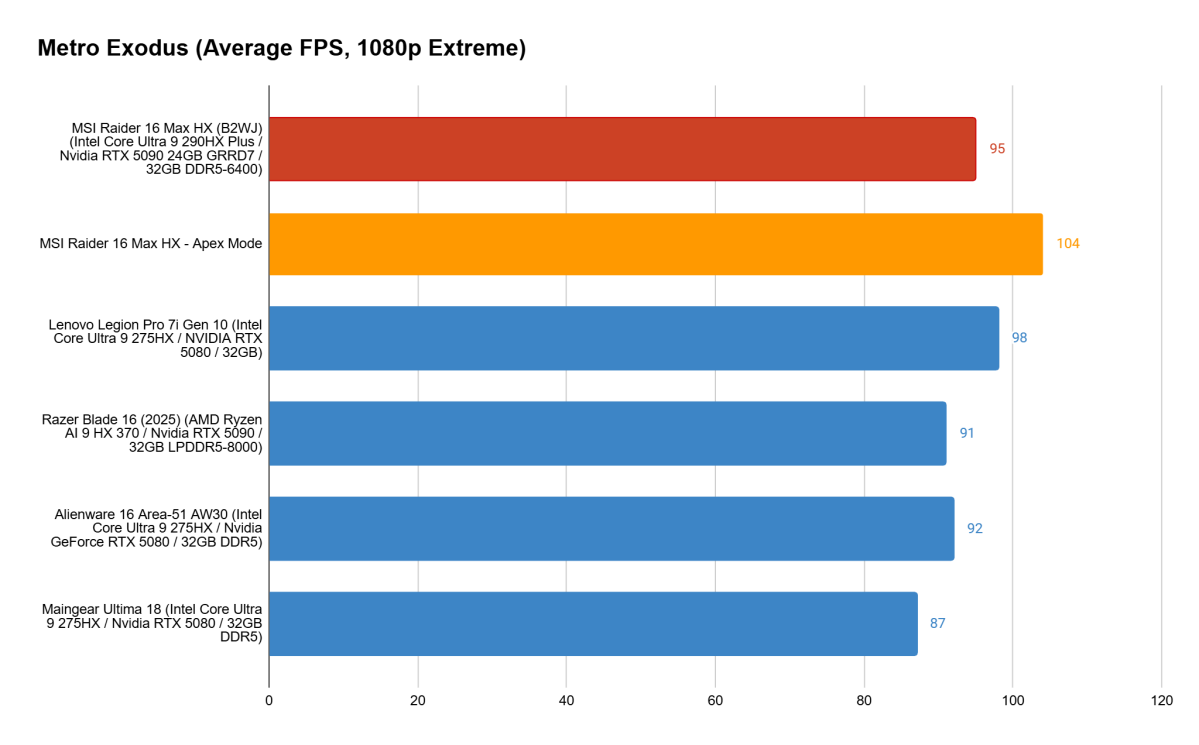
It’s a similar struggle in Metro Exodus, which continues to stymie even extreme performance hardware like this with its demanding graphics. The MSI Raider 16 Max HX can lead the pack, but it’s a very narrow victory. The RTX 5090 adds a lot to the price tag, but won’t do much in all gaming scenarios.
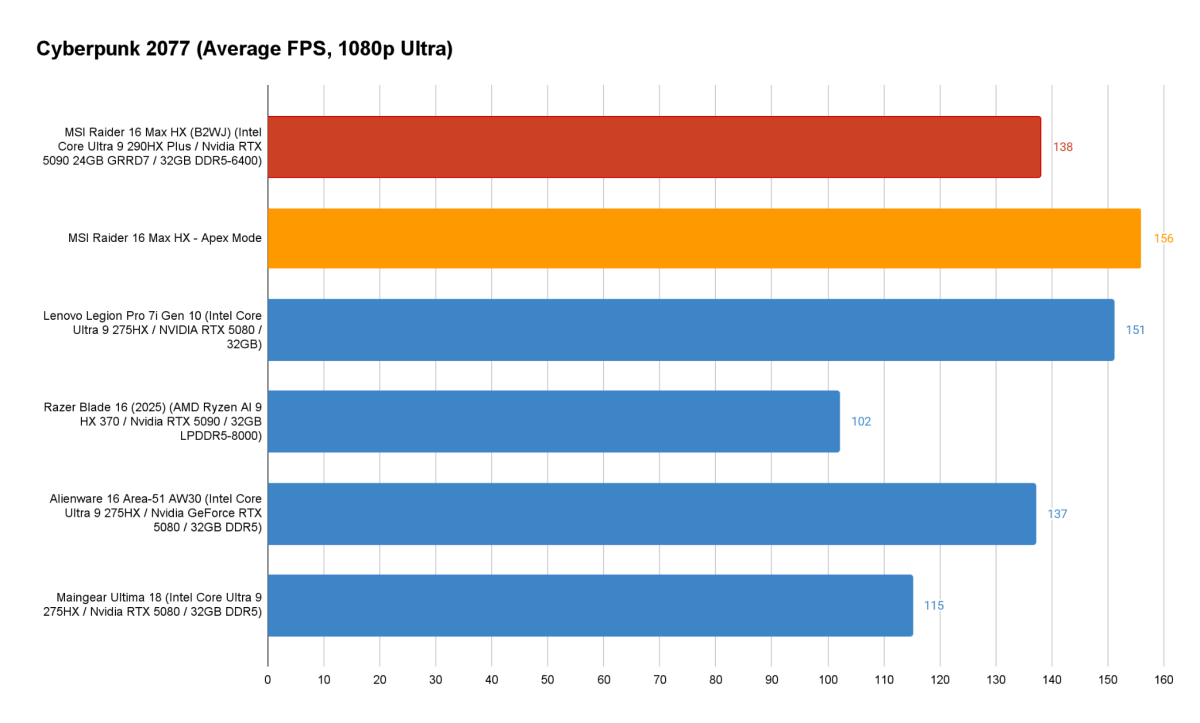
Even in Cyberpunk 2077, the field is tight for the MSI Raider 16 Max HX. This game is practically a showcase of Nvidia hardware capabilities, but the MSI Raider 16 Max HX can’t leverage its RTX 5090 to come out very far ahead of the Lenovo. It does highlight the importance of power and cooling when compared to the RTX 5090-powered Razer Blade 16, though. It’s only with ray-tracing enabled that the MSI Raider 16 Max HX gets a significant lead of close to 10-20 percent, but that still leaves it at 44fps normally and 47fps in Apex Mode.
Overall the performance of the MSI Raider 16 Max HX is excellent, but it’s not exceptional. A higher-class of hardware should come with a higher-tier of performance, but at many turns, the MSI Raider 16 Max HX at best provides a marginal benefit and occasionally fails to come out ahead at all.
MSI Raider 16 Max HX: Battery life
The MSI Raider 16 Max HX makes a surprising turn when it comes to battery life. It’s very good about disabling the GPU when running on battery power (though you can override this if needed), and that leads to helpful power savings. This was enough to help the MSI Raider 16 Max HX run for a little over eight hours in our offline video playback test. That got it well ahead of most competitors save the Razer Blade 16, which struggled terribly in performance benchmarks.
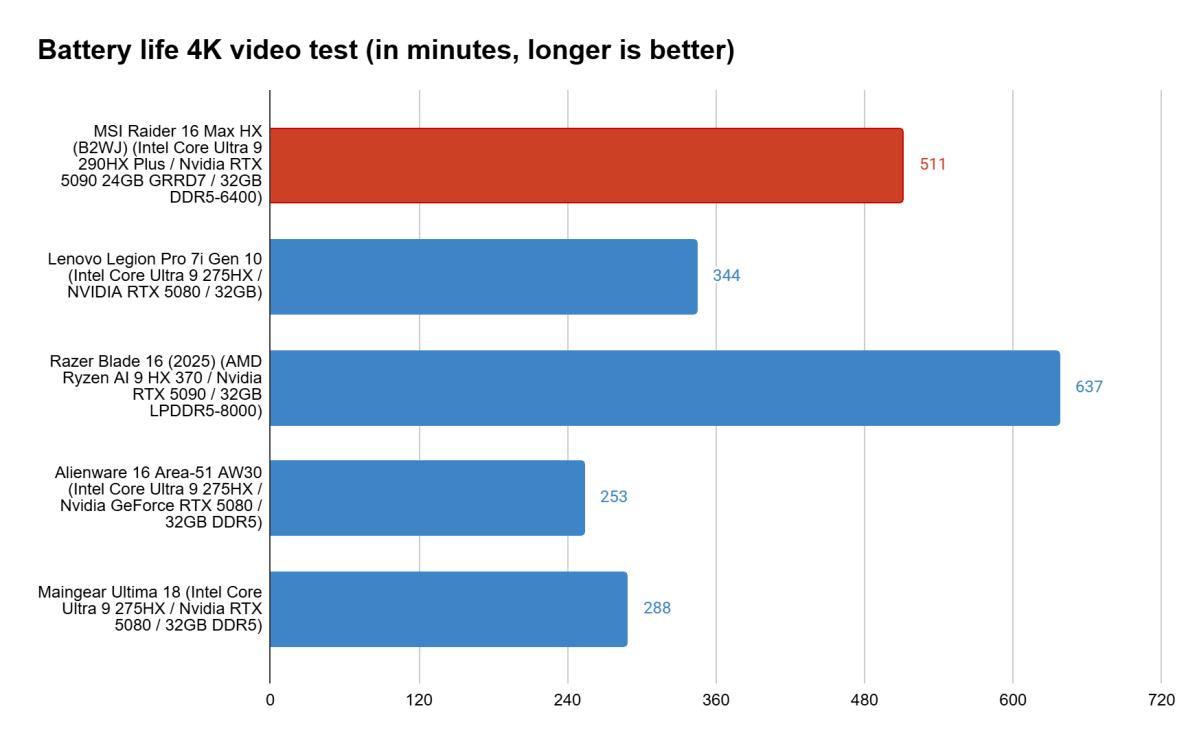
In active use, the power usage isn’t egregious either. I found the system regularly holding up for about five to six hours of runtime browsing the web and drafting articles. It’s not competing with thin-and-lights, but it’s solid for a gaming laptop.
MSI Raider 16 Max HX: Conclusion
The MSI Raider 16 Max HX has some good things going for it. For a system packing such high-end components, it’s surprising that it isn’t bulkier. It has an excellent display and robust connectivity options, but that isn’t quite enough to set it apart from the pack. And while it can deliver extreme performance that lets it pull ahead of its competition, it doesn’t consistently outperform more affordable machines running on lower-tier hardware. Its leads are often quite narrow.
As it stands, the MSI Raider 16 Max HX’s edge may be confined to specific use cases such as AI applications, where its specific hardware can shine. But as a gaming workhorse, there’s better value elsewhere.