I used to think business automation was one of those phrases consultants say right before they open a slide deck full of arrows and rounded rectangles. It sounded expensive, technical, and vaguely designed to make regular humans feel underqualified.
Meanwhile, I was over here doing deeply glamorous work like copying form submissions into a CRM, creating new tasks for client projects, and sending the same follow-up email for the 400th time. If there were an Olympic event for “Ctrl + C, Ctrl + V,” I’m certain I would’ve podiumed.
That’s what makes business automation so appealing: it takes the boring, repetitive, and error-prone work your team does by hand and gives it to software instead. At scale, it can transform your operations and unlock new opportunities for your business.
This piece walks through what business automation is, the main types, where it helps most, and how to start without turning your company into a science project.
Table of contents:
What is business automation?
Business automation is the use of technology to automate repeatable, rules-based work, enabling tasks and processes to run with minimal human intervention. In practice, it means using software, integrations, and sometimes AI to streamline workflows across finance, HR, operations, marketing, sales, and support, so folks can spend more time on higher‑value work instead of mechanical busywork.
Automation in business covers a wide range: a single two-step trigger between two apps, a full department-wide workflow with conditional logic, or an AI agent that makes judgment calls along the way. The common thread is that something you used to do by hand (or nag a teammate about) now happens automatically when a specific condition is met. And if you’ve ever typed “just circling back” more than twice in one week, you’re the target audience.
This is also where Zapier fits in. Instead of building custom integrations from scratch, you can connect the apps you already use and automate the handoffs between them.
Picture a new client signing your contract. The moment the deal moves to “closed won” in HubSpot, automation can:
-
Spin up a new project in Asana, assigned to the right person, with a templated task list for the work ahead.
-
Add the client’s contact details to Mailchimp so they drop into your welcome sequence.
-
Create a project record in QuickBooks for time tracking and invoicing.
-
Post a message in your team’s Slack channel announcing the new client. (Complete with tasteful 🎉 emoji, if you’re feeling festive.)
Types of business automation
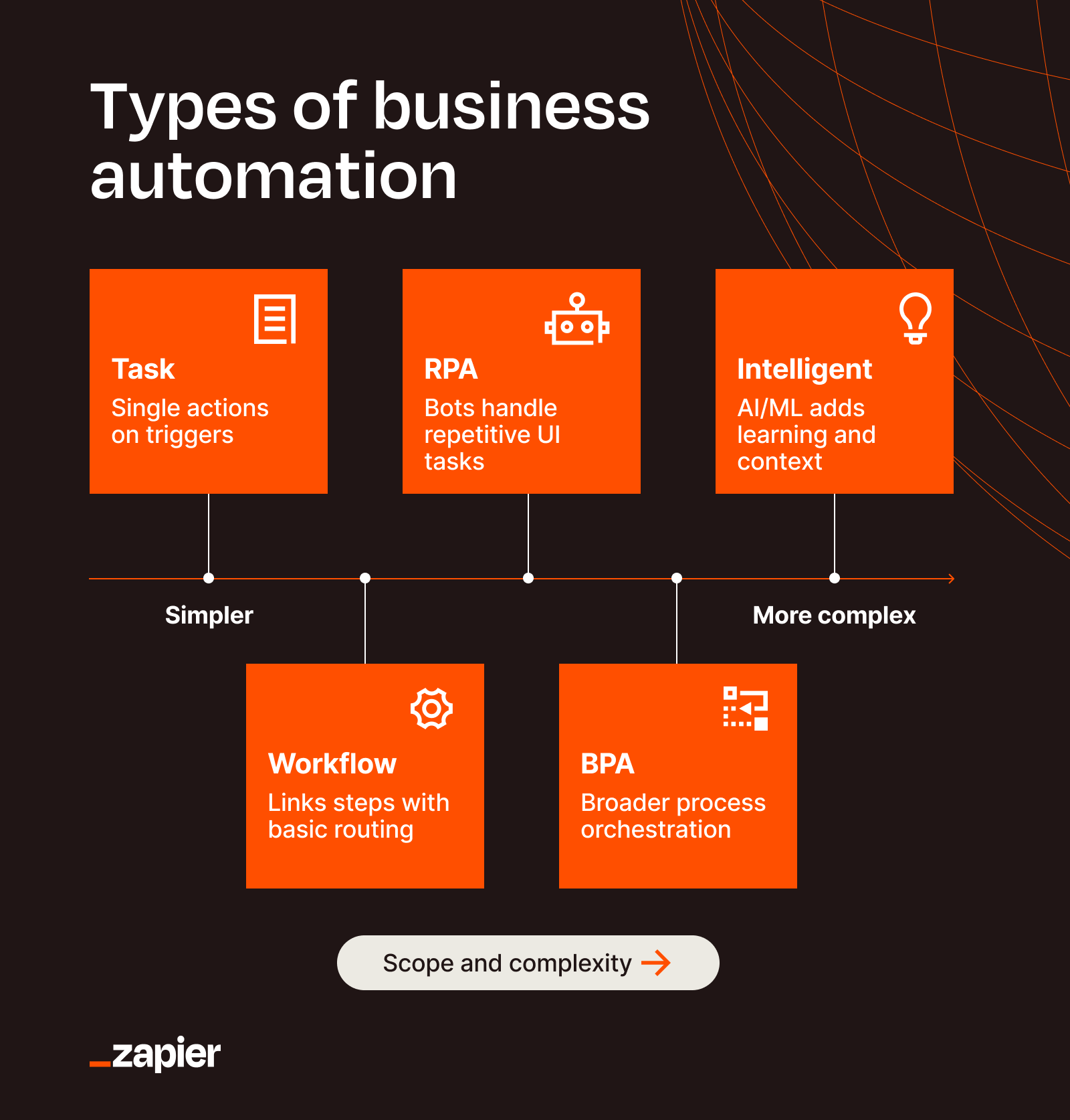
There are a handful of overlapping categories of automation, and the terms are often used interchangeably. Knowing which is which makes it a lot easier to figure out where to start.

Task automation
Task automation is the most approachable entry point to working smarter. It’s about eliminating an individual, repetitive chore. Think of it as a quick “if X happens, then do Y” action, not an entire end‑to‑end process. For example, automatically copying data from one cell to another, or instantly creating a to-do list item when you receive a certain email.
At this stage, you’re not optimizing some sprawling, multi-step process—you’re just applying a simple solution to one specific problem that drains your time. This level of automation is great because it delivers quick wins that prove the concept without triggering a full-blown digital transformation initiative (and the meetings that come with it).
In most companies, task automation is the entry level of business automation—you automate the most repetitive micro‑tasks first, then later orchestrate them into larger workflows.
Workflow automation
Workflow automation strings many tasks together into an end‑to‑end sequence to achieve a bigger outcome. It connects a specific series of steps across a few apps—just enough to solve one problem cleanly without attempting to automate an entire department.
For example, maybe every time someone submits a Typeform, you want to create a lead in your CRM, assign an owner, and send a personalized follow-up email. That’s a workflow. It’s not transforming your whole company, but it is removing a repetitive chunk of work that nobody needs to keep doing by hand.
This is the sweet spot for a lot of teams, because workflow automation is usually where you get fast wins. You don’t need an 18-person council. You just need one annoying sequence of steps and a willingness to stop doing it manually.
Robotic process automation (RPA)
Robotic process automation uses software bots to mimic the clicks and keystrokes a human would make in an application—opening files, moving between fields, or copying data from one screen to another. It’s especially useful when you’re dealing with legacy systems that don’t offer a modern API or easy native integrations.
Zapier isn’t an RPA tool in the classic sense, but it can work alongside business automation technologies like RPA by feeding bots the right information or triggering downstream actions once the bot finishes its work. For example, if you need new leads to end up in both your modern CRM and a 15-year-old billing system that only accepts keyboard input, an RPA bot can handle the latter while Zapier handles everything else.
Business process automation (BPA)
Business process automation maps and automates an entire multi-step process across a team or department. Think employee onboarding from start to finish, vendor payment approvals, customer escalations, or expense reporting. The point is to get a whole process running reliably without human handoffs at every step.
For example, imagine a ticket marked “urgent” in Freshdesk. Zapier can open a high-priority task in Asana assigned to the support lead, post an alert in your Slack #escalations channel, and log the ticket details in Airtable for the weekly report—all from that one trigger.
Intelligent automation (AI automation)
Intelligent automation adds AI to the equation. So instead of just shuttling data when a trigger occurs, the AI automation can also interpret information, summarize content, categorize requests, extract meaning, or help decide what should happen next.
That’s useful when the work includes some level of judgment, but not so much that a human needs to personally inspect every single item. For example, AI can summarize meeting notes and pull out next steps, classify incoming support tickets by urgency, analyze feedback themes, or draft responses based on the context it’s given.
With Zapier, you can build AI-powered workflows that combine app automation. So an IT alert, for instance, could be analyzed for severity before it gets routed, or a support ticket could be summarized and tagged before it lands with the right person.
Business automation benefits
Every automation pitch eventually lands on “save time,” which is true but undersells the actual payoff. Here’s what business automation solutions tend to deliver once they’re running:
-
Time savings: The small, repetitive stuff stops hijacking your day. Instead of manually updating records, sending reminders, creating tasks, and chasing teammates, those actions happen automatically in the background.
-
Reduced human error: Humans are excellent at judgment, context, and big-picture thinking. We’re less gifted at typing the same email address into four different tools without eventually turning “.com” into “.con.” Automation keeps data moving consistently.
-
Scalability without more headcount: If your workload doubles, manual processes tend to break first. Automation helps you handle more leads, tickets, requests, and internal tasks without needing to add more headcount.
-
Better data integration: Most teams don’t lack software. They have too much of it. The real issue is apps that operate in silos. Business automation solutions connect systems so information stays in sync. (One source of truth beats five almost right ones.)
-
Faster response times: Leads, support tickets, and new hire provisioning don’t just sit around waiting for a human to notice. Speed matters because in a growing business, manual delays compound into lost revenue and friction.
-
More room for meaningful work: When the admin burden drops, people can spend more time on problem-solving, customer relationships, thoughtful planning, and execution.
Business automation examples
Business automation can help just about every team. The use cases look different, but the pattern is the same—if work follows a repeatable sequence, there’s a good chance some part of it can be automated. Here’s what that looks like across a few common teams.
Sales
Sales teams lose deals to slow response times more than they lose them to competition. Every minute a rep spends retyping a lead’s info into the CRM or hunting down contract status is a minute they’re not talking to a prospect or attending events. Good sales automation keeps the CRM current, routes leads fast, and fires follow-ups before anyone has to remember to.
Contractor Appointments, an inbound appointment generator, was losing business because after-hours homeowner replies sat unread until the next morning. They used Zapier to build an AI scheduler that parses incoming texts, checks contractor availability, and books appointments on the spot. The team saw 20 to 50 extra appointments a day from late-night replies that used to vanish.
Marketing
Marketing automation is about doing personalized work at scale, which is a contradiction that can only be resolved with software. The same rules apply to content production—you can’t hand-craft a weekly blog post for every audience segment, but you can build a system that researches, drafts, and routes them for review.
JBGoodwin REALTORS ran into the limits of human bandwidth when the marketing team couldn’t keep up with content needs for nearly a thousand agents. They built flows in Zapier that auto-generate blog posts, news summaries, and weekly social content. This made it easy for the sole marketing coordinator to post content at scale and boost visibility for their agents.
HR
HR teams are buried in paperwork, employee support, and the endless rhythm of recruiting and onboarding. Automation in HR usually means fewer admin hurdles for the team and a smoother experience for everyone they support—routing requests, setting due dates, generating offer letters, and scheduling check-ins.
Alma, a mental health startup with 500+ employees, built a custom help desk in Asana with 180+ Zapier automations running the backend—tickets get routed to the right person, due dates set against Alma’s business calendar and SLAs, backup owners added when someone’s out. This resulted in a 45% reduction in self-service tickets, a 4.9/5 employee satisfaction score, and $50,000 in savings by avoiding third-party help desk software.
IT
IT automation is often about user management, security, ticket routing, and making sure routine requests don’t consume all the bandwidth meant for actual technical work. That could mean automatically provisioning accounts when employees join, revoking access when they leave, routing incidents based on severity, or turning submitted forms into tracked requests.
Vector Media, the largest transit ad company in the U.S., runs its IT team this way. They use Zapier to handle employee onboarding and offboarding across email, HRIS, Salesforce, and a long list of other systems. New hires trigger account provisioning across every tool, while offboarding revokes access immediately when someone leaves.
How to start automating your business
The mistake I made when I first started was trying to map my whole business before building anything. That’s backwards. The faster way is to pick one task that’s actively aggravating you, automate it, and use what you learn to automate the next one.
-
Audit the repetitive work first. Spend a few days noting what you do over and over. The tasks you dread, the ones you forget, the ones that feel like a complete waste of brainpower—those are your candidates. Write them down with the sequence of steps each one takes.
-
Ask the people who’d actually use it. If the automation serves someone other than you, talk to them before you build. The people closest to the work usually have the sharpest opinions on what’s wasting their time, and they will certainly tell you. You’ll get better automations and buy-in for the ones you ship.
-
Pick a tool that works with your existing stack. Most tasks don’t need a custom-coded solution. Zapier sits between the apps in your existing stack, and there’s a good chance someone has already built the workflow you need—browse the Zapier template library before you build from scratch.
-
Start small, then move on to the next obvious candidate. Build one workflow. If it saves time and the people using it are happier, find the next bottleneck and automate that. Compounding one-hour wins beats chasing a five-year master plan.
Use Zapier for your business automation
Business automation doesn’t have to mean rebuilding your company around some massive new system. Most of the time, it means noticing where work gets stuck, where people are repeating themselves, and where software could handle the handoff more reliably.
That’s what Zapier is good at. With over 9,000 integrations, you can safely connect the apps your team already relies on, build automated workflows across departments, and add AI where it helps. Whether you’re automating lead routing, onboarding, approvals, reporting, or support processes, Zapier helps you get the repetitive work out of the way so people can focus on creative, strategic, and interpersonal duties. And you can access it from wherever you do your work: chat apps with Zapier MCP, coding agents with Zapier SDK, your terminal with Zapier CLI, or directly on Zapier’s visual workflow builder.
Related reading: